
From 40 Spreadsheets to One System: Building an Operating System for a New York Developer
- Client
- Harborline Development Group (name changed)
- Industry
- Real Estate Development
- Location
- New York, NY
- What we built
- A custom web app that serves as the company's central operating system
The Situation
Harborline is a mid-sized real estate development company managing around a dozen active projects across New York at any given time, from early land acquisition through construction and leasing.
Like many growing firms, they ran their business on Google Sheets. Every part of the operation had its own tracker: one for project budgets, one for permits and approvals, one for contractor schedules, one for vendor payments, one for leasing, and more. Over the years this grew to more than 40 separate spreadsheets, each owned by a different person and formatted a different way.
It worked when the company was small. But as they grew, the cracks started to show.
The Problem
Information lived in too many places. If a project manager wanted to know whether a permit delay would affect the budget, they had to open three different files, compare them by hand, and hope everything was up to date.
Nobody had a single view of the business. Leadership spent hours each week chasing updates and piecing together reports before meetings. Numbers sometimes didn't match between sheets because someone updated one file and forgot the other. Links to important documents got lost, and new team members struggled to figure out which spreadsheet was the "real" one.
In short, the team was spending more time managing their trackers than managing their projects.
What We Built
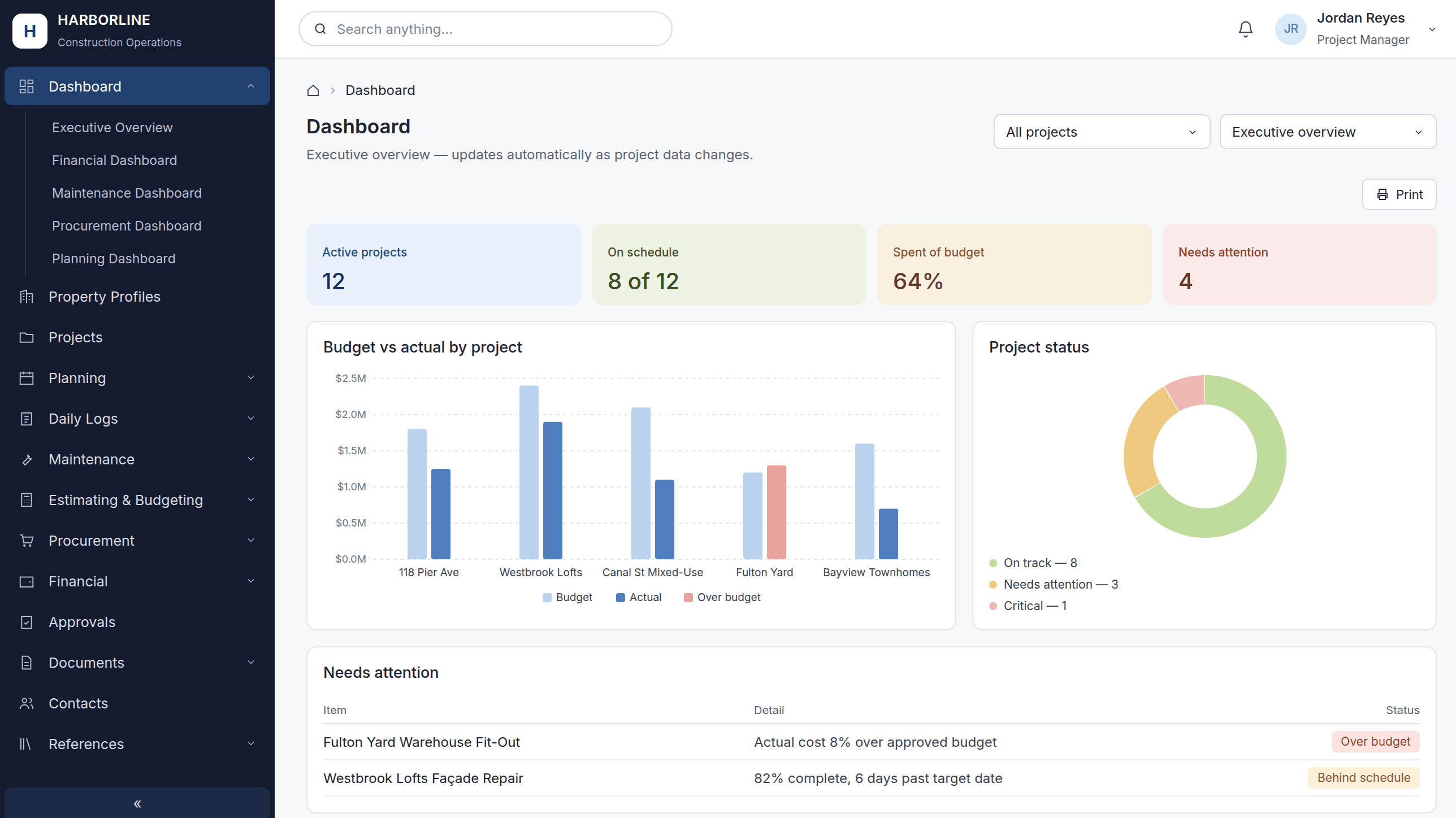
We replaced the scattered spreadsheets with one web app built specifically around how Harborline works. Think of it as an operating system for the company: one place where every project, task, budget, and deadline lives together.
One home for every project
Each development project has its own page showing everything at a glance: budget, timeline, permits, contractors, and open tasks. No more jumping between files.
Everything connected
Because all the data lives in one system, the pieces talk to each other. When a permit date slips, the project timeline updates. When an invoice is approved, the budget reflects it right away.
A live dashboard for leadership
Executives can see the health of every project in real time, including what's on track, what's behind, and where money is going, without waiting for someone to build a report.
Clear ownership
Every task and tracker item has an assigned person and a due date, so it's always clear who is responsible for what.
Familiar, simple design
We kept the layout clean and easy to learn so the team could switch over without extensive training. We also migrated their existing spreadsheet data into the new system, so nothing was lost and no one had to start from scratch.
The Results
Within the first three months of launch:
- More than 40 spreadsheets were consolidated into one system.
- Weekly reporting time dropped from about 6 hours to under 30 minutes.
- Leadership gained real-time visibility into every active project.
- Errors from mismatched data between files were effectively eliminated.
- New hires could find what they needed on day one instead of learning a maze of files.
The Takeaway
Spreadsheets are a great place to start, but they don't scale with a growing business. By bringing everything into one purpose-built system, Harborline's team now spends less time hunting for information and more time doing what they do best: building.
Client name, people, and project names have been changed to protect client confidentiality.